See what’s closing inbefore it becomes urgent.
If you run a small business, the deadline, the customer who’s waiting, the school pick-up and the insurance renewal are all yours to remember. Radar puts them on one screen. It reads the calendars, inboxes and tools you already use, so a busy week at work doesn’t quietly cost you at home, and home doesn’t ambush you at work.
£10 a month at the founding price until 31 March 2027, locked for 24 months. Your money back within 14 days if it isn’t for you.
The sample needs no sign-up · UK-run · your data stays in the systems that own it.
Start today with Radar Lite: the habit tracker on its own, free, for you and anyone 13 or over in the family.
“Work and home don’t live in separate weeks. Radar watches both, so you don’t have to.”
Four in ten small-business owners lost money or a customer to something that slipped
A follow-up missed, a renewal that lapsed, a deadline that arrived before the work was done. Not because nobody knew: the date was in a system somewhere. Nobody had checked there was time to do it.
owners of firms with 1 to 19 staff said something slipped in the last three months that cost them money or a customer.
said it had happened more than once.
put what it cost at £100 or more, and three at £1,000 to £10,000.
Radar’s own online survey of UK adults, run through the research panel Prolific in October 2026, screened for owners of firms with 1 to 19 staff. Answers that failed an attention check or were rushed were left out. A panel survey, not a measure of every UK business.
“It helps prioritise urgent things that need doing imminently and helps you not to forget about things”
Review on G2, 26 Oct 2026
“It’s helping me better understand the time I have available to me and how long each deadline will actually take and how much time I have available to work on priorities.”
Review on G2, 19 Oct 2026 · incentivised review
You are the integration layer
The deadline is in a project plan, the deal is in the CRM, the parents’ evening is in the family calendar, the renewal is in your personal inbox, and the thing you promised is in your head. Nothing is late, until it all is.
Home pays for busy weeks
The week a deadline lands is the week the school form, the birthday and the car’s MOT slip. Nobody decided that; nothing was watching both.
The loudest email wins
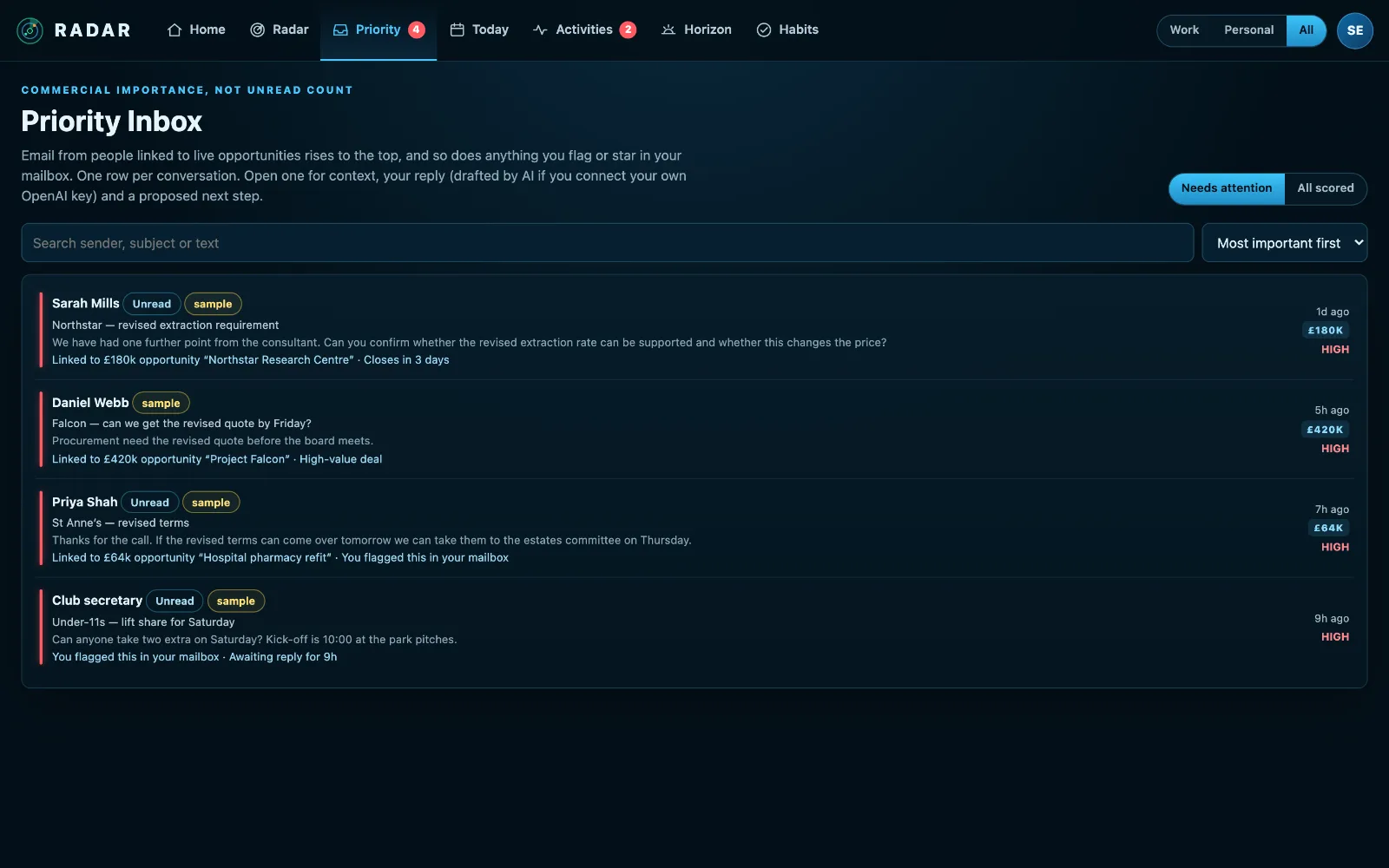
An unread count treats a newsletter, a customer with a £180k decision and the insurer who needs documents by Friday as equals.
Another system to maintain
Most tools ask you to re-enter what your calendars and inboxes already know. So you stop, and it goes back in your head.
Radar in under a minute
Filmed in the sample radar you can open yourself. Sam Ellis and Meridian Systems are invented; what the film does, the product does.
When it’s due, and whether you have the time to do it.
A to-do list tells you a job is due on Friday. It doesn’t tell you that your week is already full. Radar checks your calendar for every job you put on it, and says whether there are enough free hours left to do the work before the date.
Hours against free time
Say how many hours a job needs. Radar counts the free working time before its date and tells you: enough, only just, or not enough, and by how much.
Book the time
It suggests focus blocks in the gaps, and with Outlook or Microsoft 365 it books them in your calendar. A meeting already there can count towards the job too.
It keeps checking
Move a block past the deadline or delete it, and the job goes back to amber. A dot with an exclamation mark is work with no time set aside.
Connect → Radar → Act
Connect
Sign in to Radar, then connect your work calendar and inbox, your personal ones, and your CRM or ERP if you have one. Start with whichever you like.
Radar
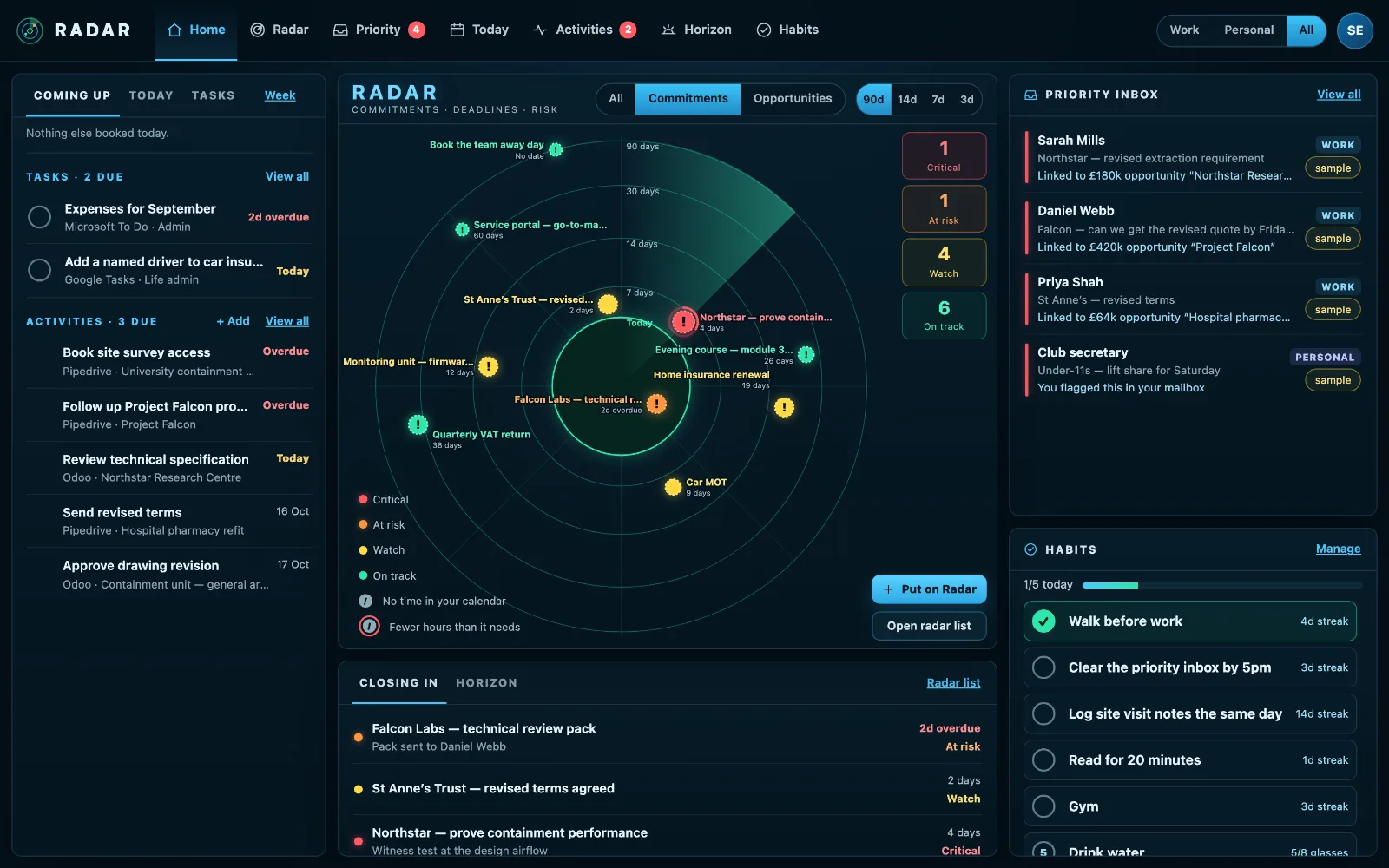
Everything that has a date, a value or a consequence is plotted by how close it is, work and personal together. Colour shows risk as well as time.
Act
Reply to the customer who is waiting, protect the evening that matters, reserve time for the work with no runway, clear it from your Radar.
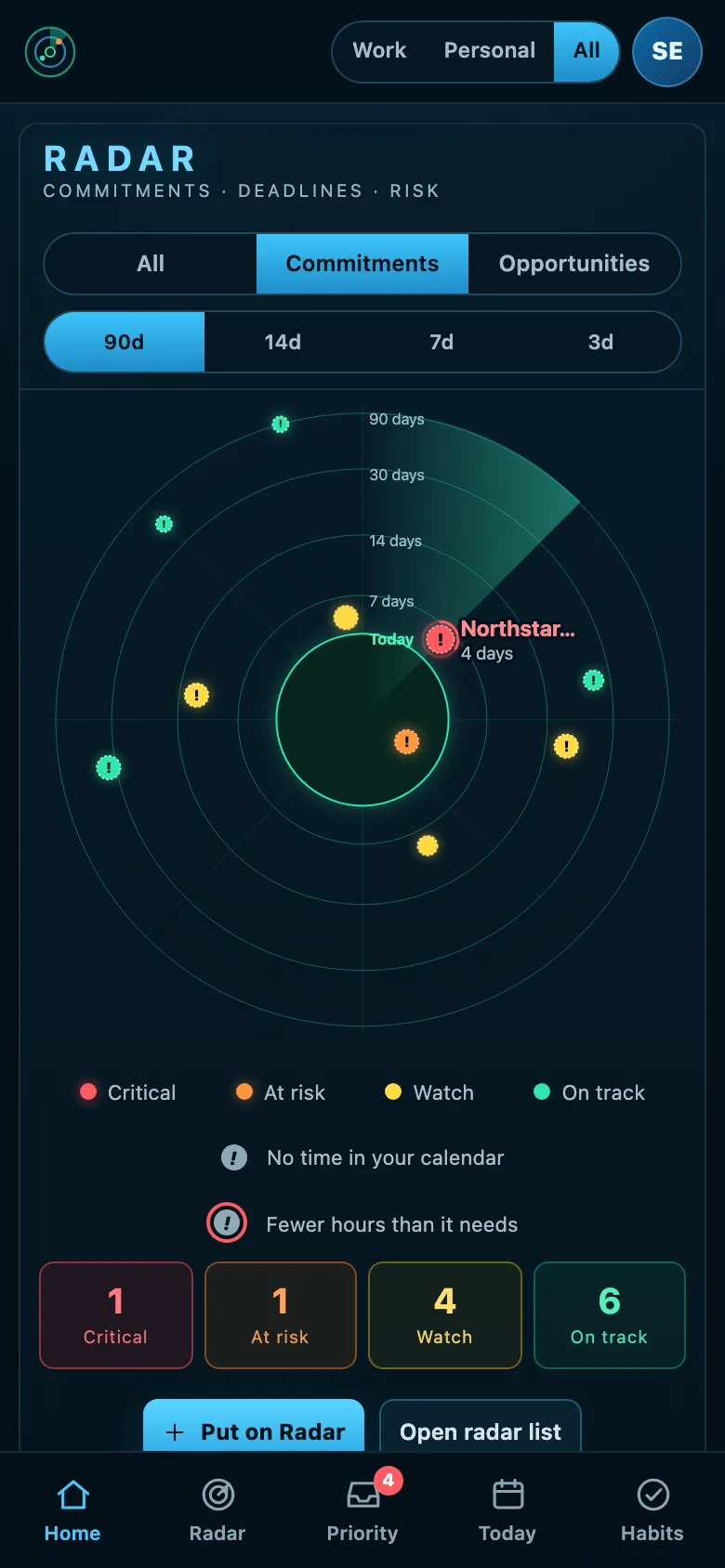
The same Radar in your pocket
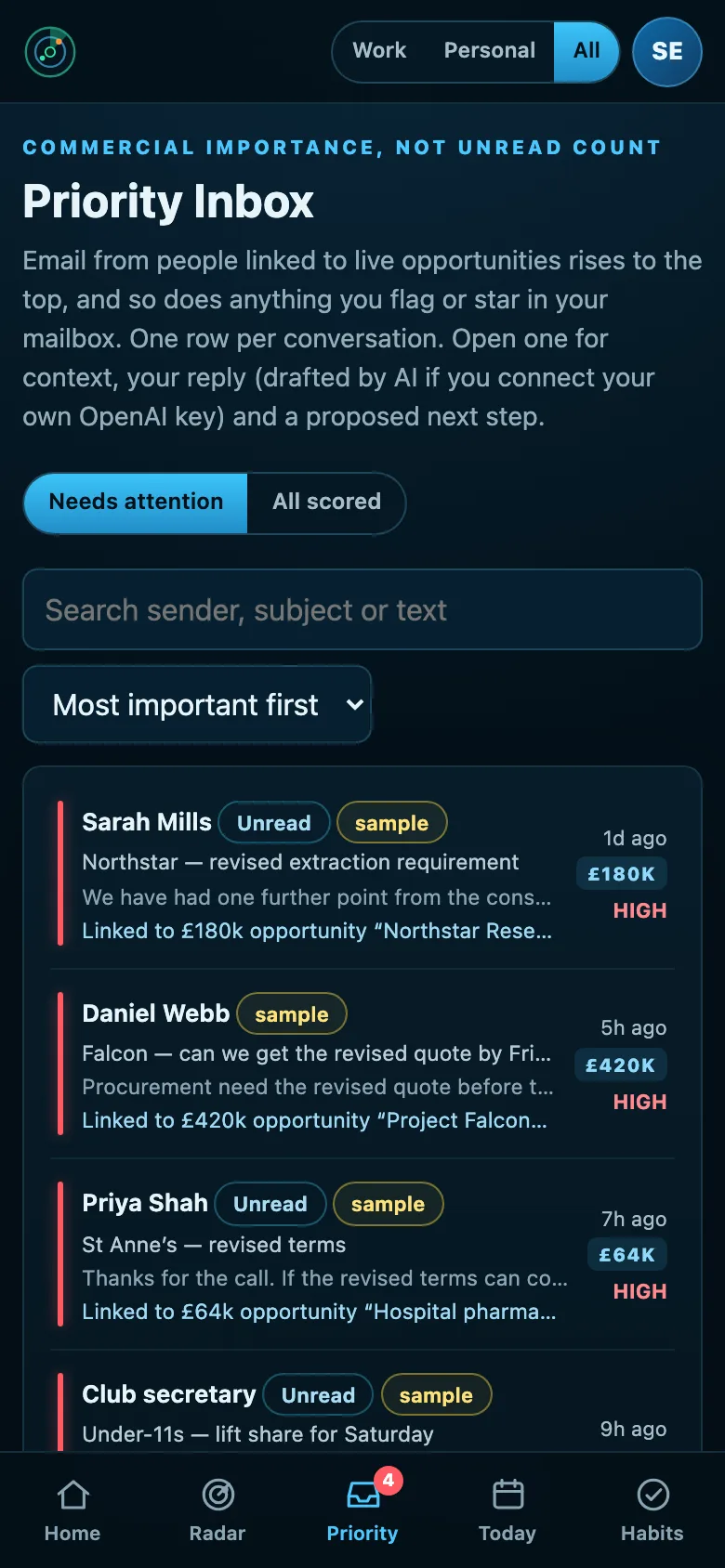
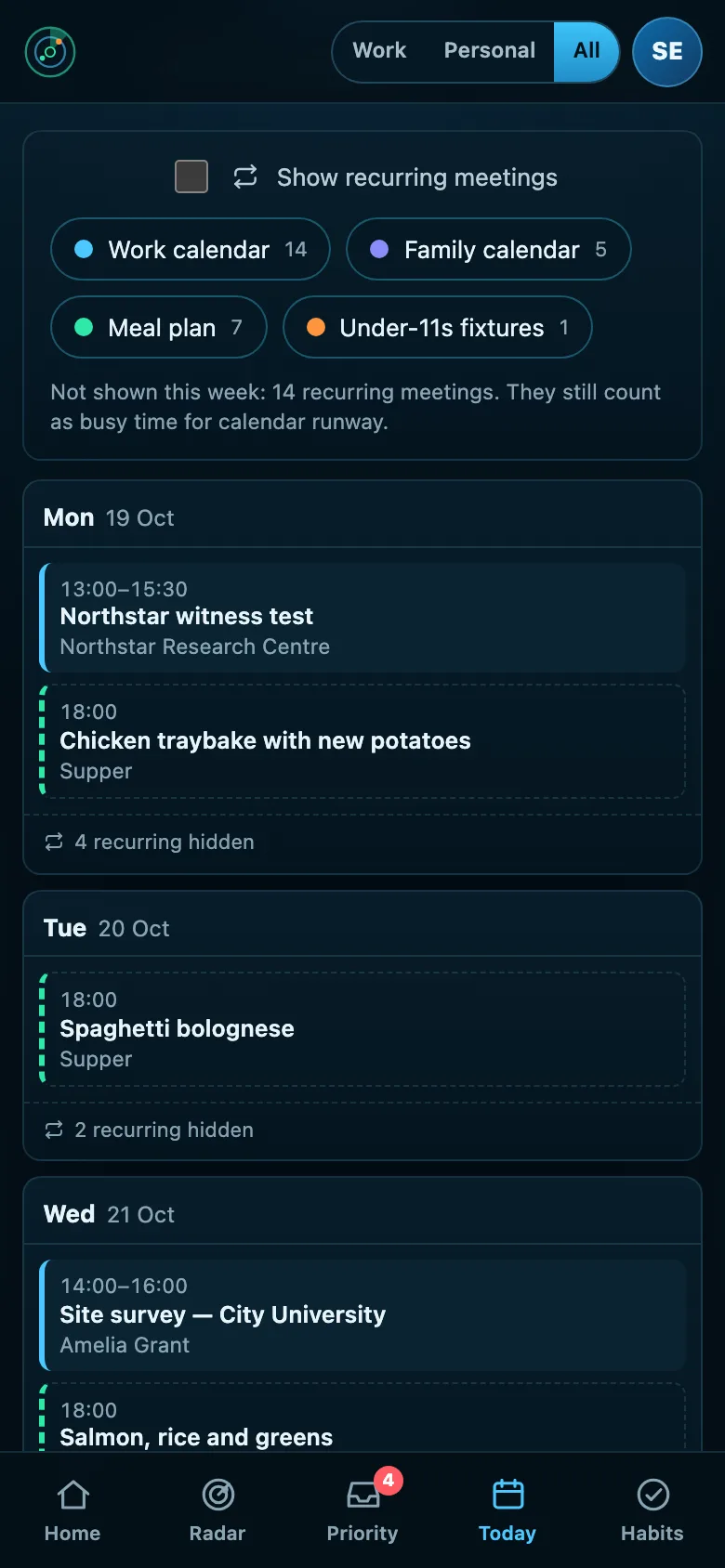
Radar runs in your phone’s browser, and you can add it to your home screen like an app. The radar, the email that needs you, your week and your habits, laid out for one hand.
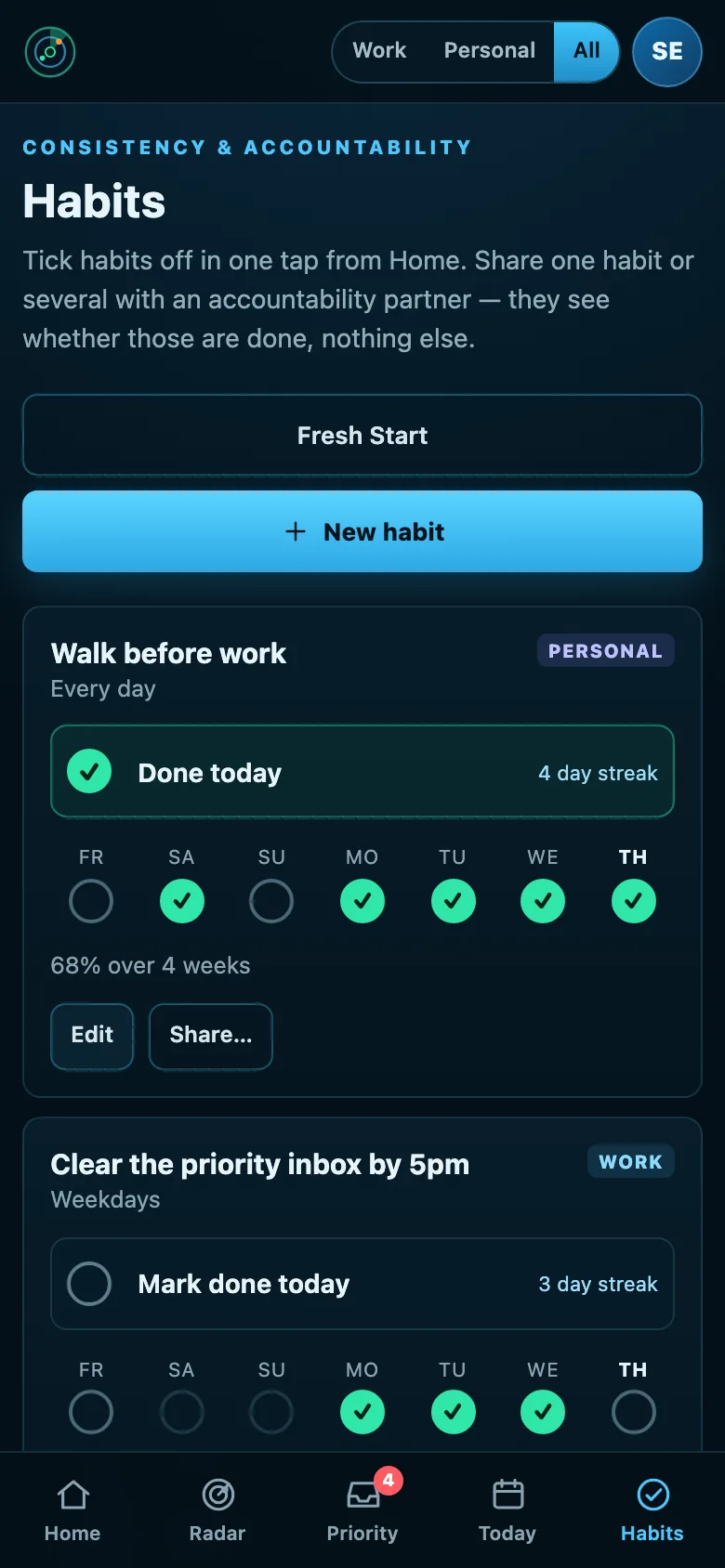
One picture, with a switch when you need it
Most days you need both on the same screen: the 15:15 pick-up sits between the customer call and the proposal, and it isn’t optional. When you want to switch off, one switch shows only Personal. When you need to focus, only Work.
Every calendar, without the routine
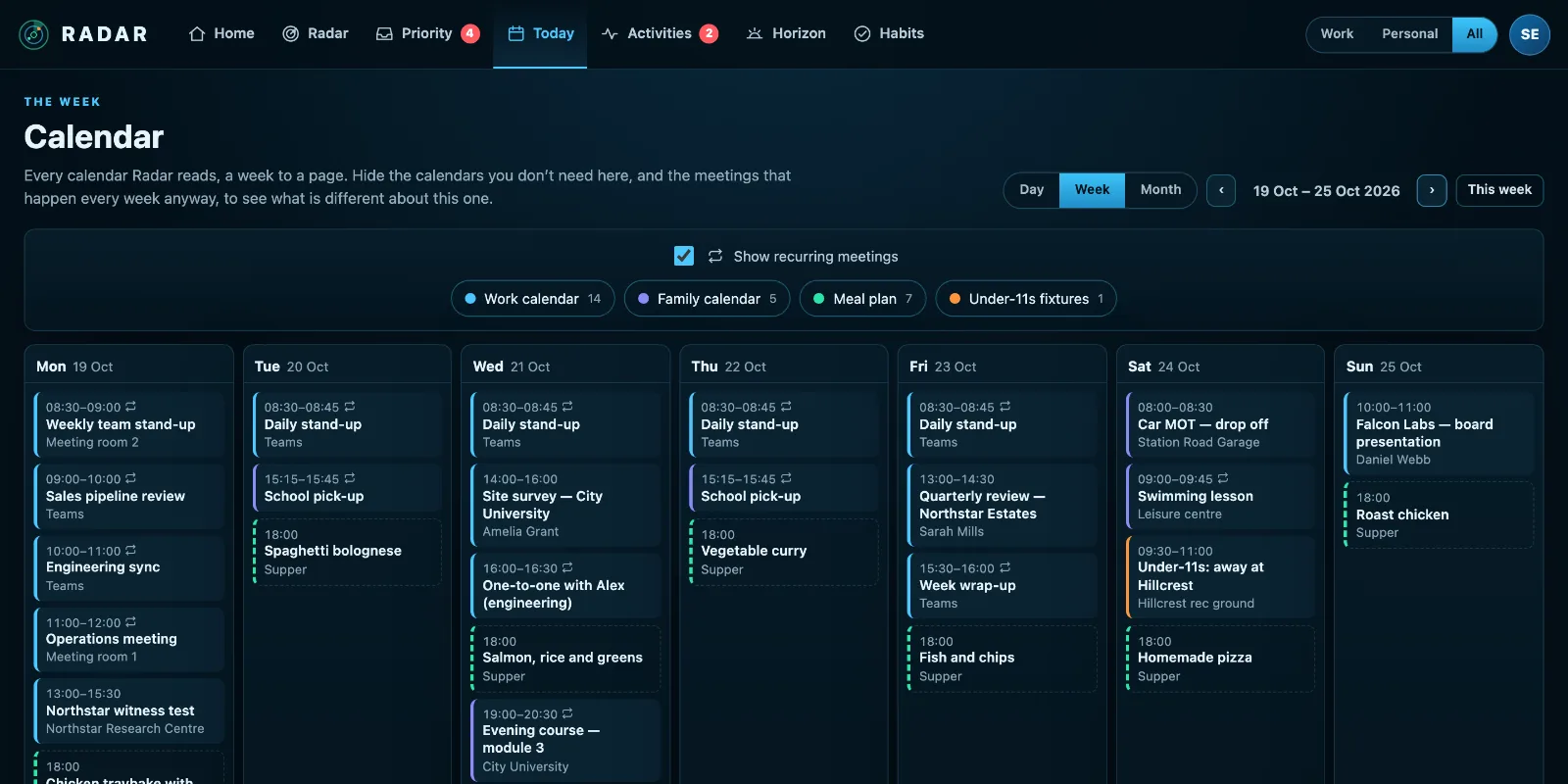
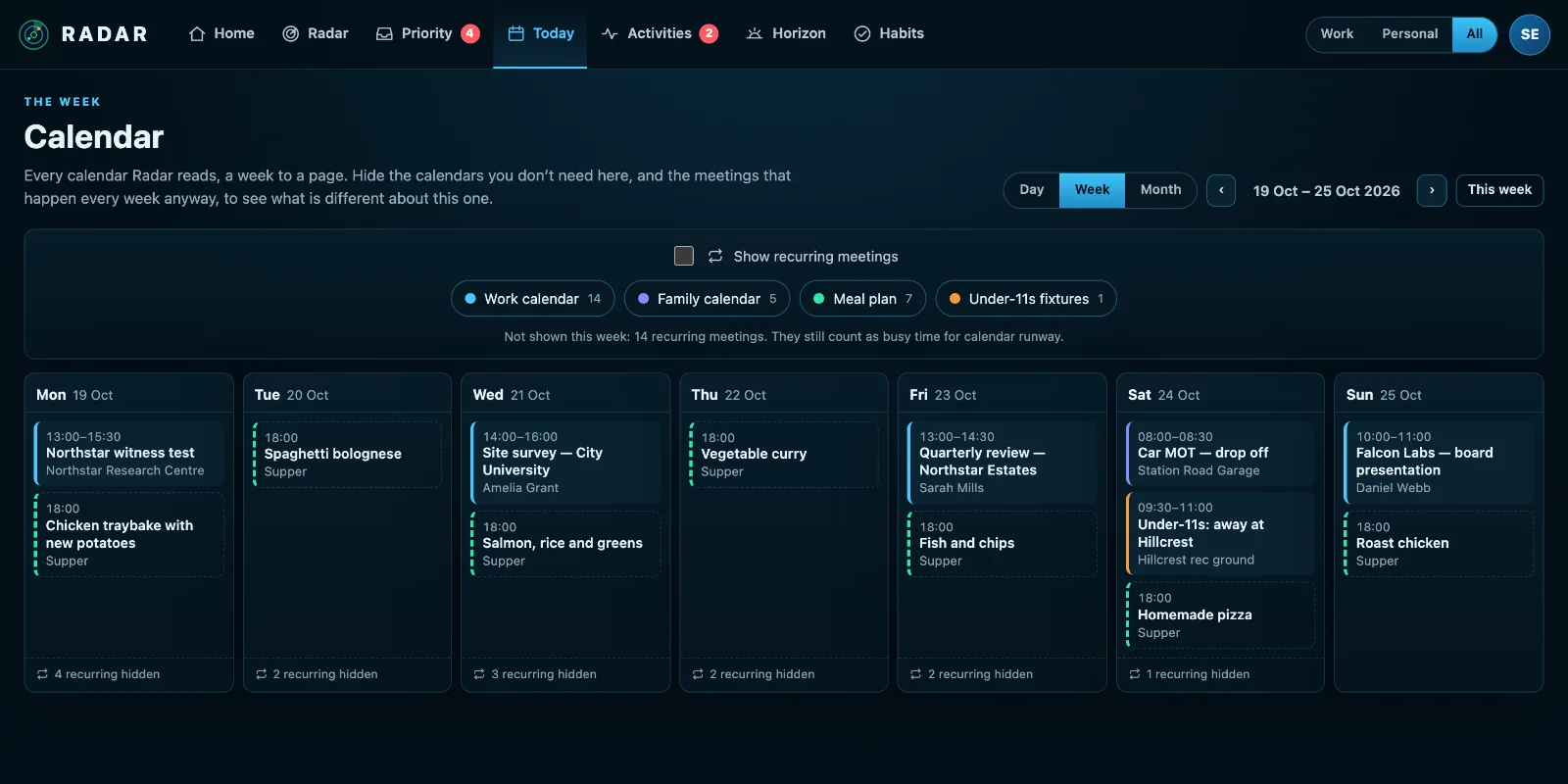
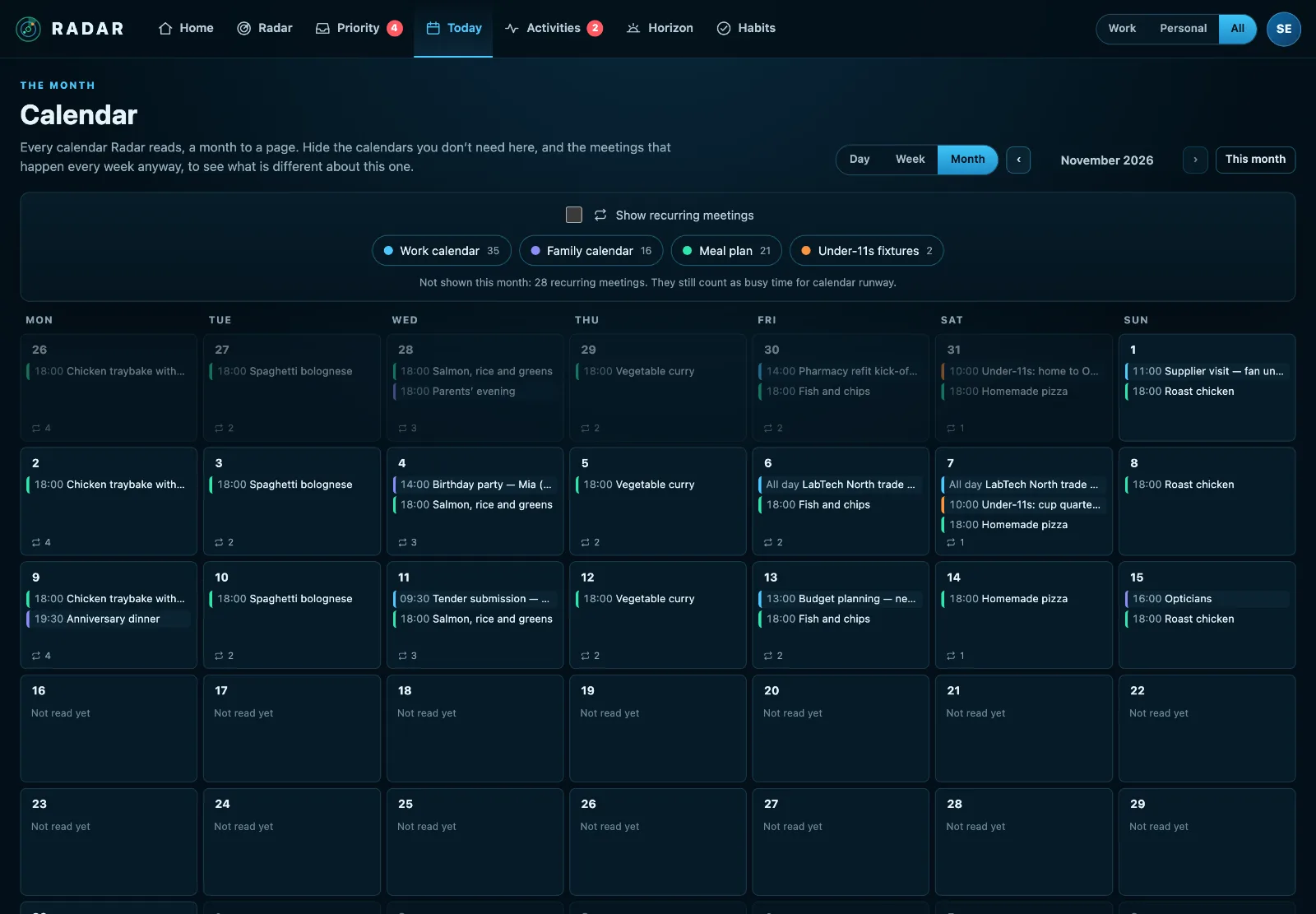
Your work calendar and your personal one together, a day, a week or a month at a time, so you see the clash before you accept the meeting. Hide the meetings that repeat every week and what’s left is what’s different.
Promises, wherever you made them
The proof point you owe a colleague and the thing you told your partner you’d sort this week go on the same radar, weighed the same way.
Life admin and habits
Renewals, appointments and the things that only get done on a quiet Sunday stay visible, and habits tick off in one tap.
Radar asks, so you don’t have to remember
When does the car insurance renew? When is the boiler due a service? Whose birthdays mustn’t you miss? Radar works through the areas of your life a few questions at a time, and turns each answer into something that comes back to you in good time, every year.
A few minutes at a time
Car, home, bin day, money, health, family, documents and travel, pets, work, study. Do one area over a coffee and the rest another day. Radar remembers where you got to.
Set once, repeats for ever
Mark the MOT done and it moves to next year. Each item reminds you when it matters: a month before a renewal, nine months before a passport expires.
Not sure? That counts
Don’t know the date? Radar adds a task to find it out, so the question doesn’t disappear.
One radar for every kind of deadline
Commitment Radar
Project deadlines, promises, exams, renewals and personal goals. Distance is time to the meaningful deadline; risk also weighs consequence, confidence, progress, dependencies and whether your calendar actually has room for the work.
Opportunity Radar
Open deals from your CRM. Distance is the expected close date, size is value, and colour picks up stalled deals, missing next steps and overdue activities. Show deals beside your commitments on one plot, or one at a time.
Priority Inbox
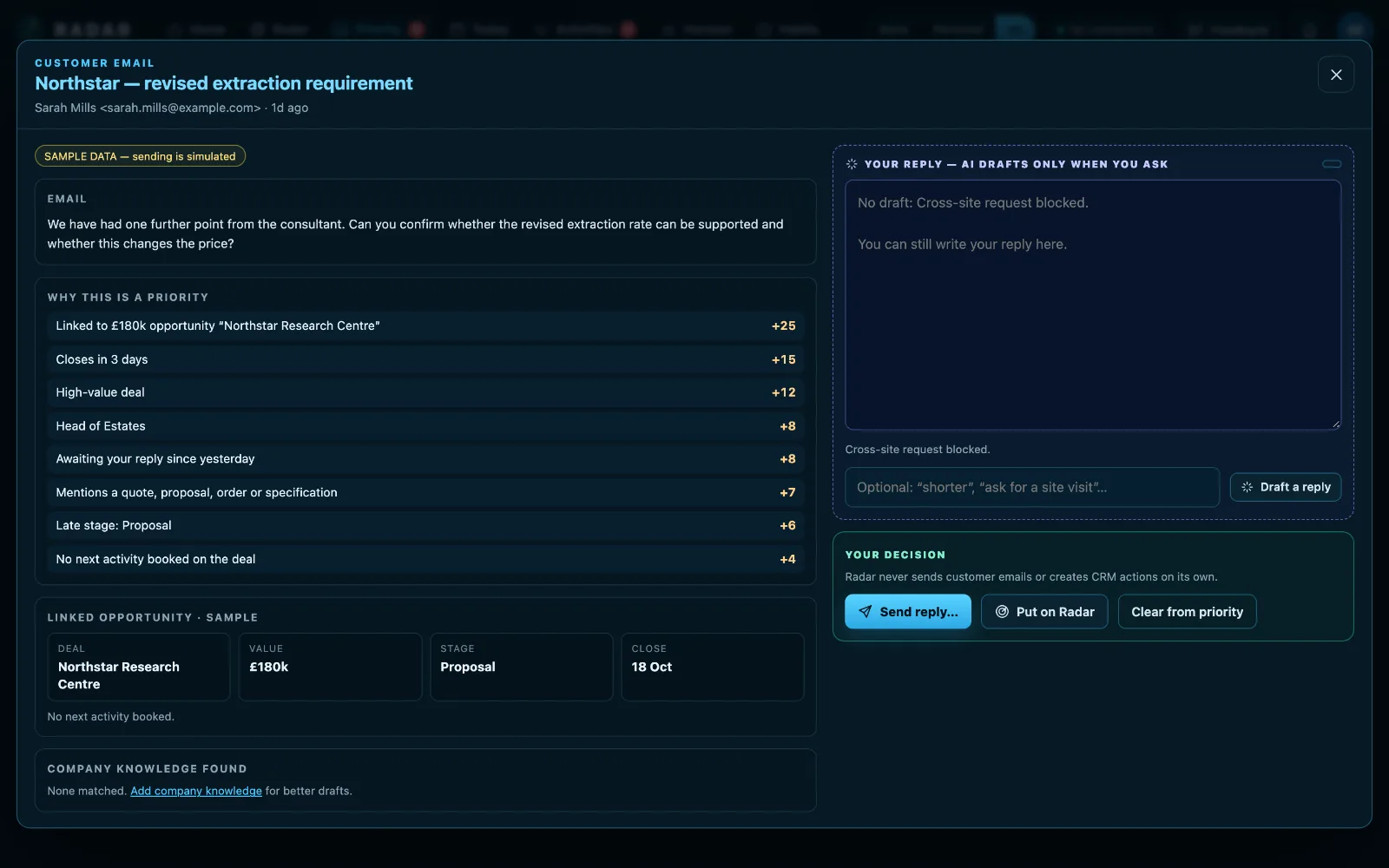
The few emails that need you, from Outlook and Gmail: who has been waiting, what you flagged or starred, and, if you have a CRM, which deal it is about. Promotions are ignored and eight replies are one row. Archive it, or reply with your own signature and logo.
Horizon & habits
Anything dated beyond ninety days waits on the Horizon and arrives on the Radar when it is close enough to matter. Habits tick off in one tap, or count up through the day, like eight glasses of water, with an accountability partner if it helps.
Zoom in on a week on fire
Ninety days is the default. Zoom to 14, 7 or 3 days and the radar spreads that week out; press Critical or At risk and only those stay lit. Commitments, deals and, with Ninety, Rocks: one plot or one at a time.
A free Home seat with every seat
A private Radar for your partner, for the bins, the boiler and the birthdays, that can never see your work. Share a single item with up to five people at home, and they see its title, date and whether it’s done.
Reminders that reach you
Notifications on your phone, held overnight in quiet hours, and every Monday at 7am an email of what’s overdue, this week and next. Anything can have no reminder at all.
Every account, side by side
A work Microsoft 365 beside a personal Outlook.com, two Gmails, a Plan to Eat meal plan and the school’s calendar feed. Each one Work or Personal, as you choose.
Minimal manual entry, by design
Before Radar adds a form, it asks whether a connected system already knows the answer. Manual entry is for the things no system tracks: the promise you made, the proof point you owe, the goal you keep putting off.
Sources stay in charge
Your CRM owns the deal, Outlook owns the message, Odoo owns the activity. Radar caches, ranks, links and proposes. It writes back only when you say so.
Independent and UK-run
Radar is a hosted service run by Neos Technologies Ltd. Radar runs on servers we control in the United Kingdom. Your email, calendar and CRM records stay where they are, and Radar reads only what it needs.
Human in the loop
AI drafts and suggests. It never sends an email, creates a CRM action or changes a deal on its own.
- Microsoft verified publisherNeos Technologies Ltd
- Google-verifiedcalendar access
- ICO registeredZC261269
- Hosted in the UKon servers we control
- Two-factor sign-inowners can require it
- Payments by Stripewe never see your card
- Listed on G2read or leave a review
Put it on your Radar
Every use case → · Comparing? Radar vs Docket · Radar vs Sunsama · Radar vs Akiflow
£10 a month, while the founding price lasts
One plan with everything Radar does: £10 a month or £100 a year per person, locked for 24 months, until 31 March 2027. After that it’s £15 a month. Your money back within 14 days on monthly, or 45 on yearly, if it isn’t for you. Radar Lite, the habit tracker on its own, is free.
Questions people ask
Is Radar just for work?
No, and it works best when it isn’t. Most people connect a work calendar and inbox and a personal one, and add the family commitments no system tracks. Everything is labelled Work or Personal, and one switch shows either or both.
How does Radar know about my car insurance?
It asks. Life setup goes through the areas of your life a few questions at a time, and you can skip anything or come back later. Anything that repeats, like a renewal, an MOT or a birthday, is set up once and moves to its next date when you mark it done.
Will I still be using this in six months?
Dashboards that you have to keep feeding get abandoned, and Radar is built so you don’t feed it. It reads your calendars, inboxes and tools in the background, so it is up to date on the day you come back to it, however long you have been away. Calendar runway is checked again against your calendar every time it is read, and if a focus block is moved past its deadline you are told on your phone. The Monday email of the week ahead arrives whether or not you have opened Radar, so the radar comes to you.
Is this another task manager?
No. Radar holds the small set of commitments no system tracks for you, and reads everything else from the tools you already use. The goal is fewer systems to keep an eye on.
Where does my data live?
Radar runs on servers we control in the United Kingdom. Email, calendar, CRM and ERP records stay in the systems that own them; Radar keeps a working cache so the dashboard is fast, and encrypts every credential it stores.
Can I connect more than one account?
Yes. Connect a work Microsoft 365 beside a personal Outlook.com, two Gmail accounts, or several calendar feeds. Each one is labelled Work or Personal, and has its own settings.
Can my partner use it?
Every paid seat comes with a free Home seat: a private Radar of their own for home life, which can never see your work. You can also share a single item, like the boiler service, with up to five people at home.
Will it remind me on my phone?
Yes. Add Radar to your home screen and it sends notifications for what is due, held quietly overnight, and a Monday morning email of the week ahead. You choose what reminds you, and anything can have no reminder.
Do I have to connect everything?
No. One connection is enough to be useful. Most people start with their work calendar, then add a personal calendar and inbox. You don’t need a CRM at all.
What does the AI actually do?
When you press Draft a reply on an email, it writes one using the email, the linked opportunity and your company knowledge, flags anything it could not verify, and proposes a follow-up activity. You edit and send; you confirm the follow-up. It uses your own OpenAI key, and you can write every reply yourself instead.
What does it cost?
£10 a month or £100 a year per person at the founding price, locked for 24 months, for anyone who subscribes before 31 March 2027; £15 a month after that. Your first week is free, on your own calendar and with no card; you can also look round the sample radar first without signing up. Once you subscribe, if Radar isn’t for you, you get your money back within 14 days of a monthly payment or 45 days of a yearly one, the first time you subscribe. Pricing has the detail.
Put it on your Radar.
Open to anyone. £10 a month at the founding price until 31 March 2027, locked for 24 months, and your money back within 14 days if it isn’t for you.