For the self-employed, whose deadlines are all their own
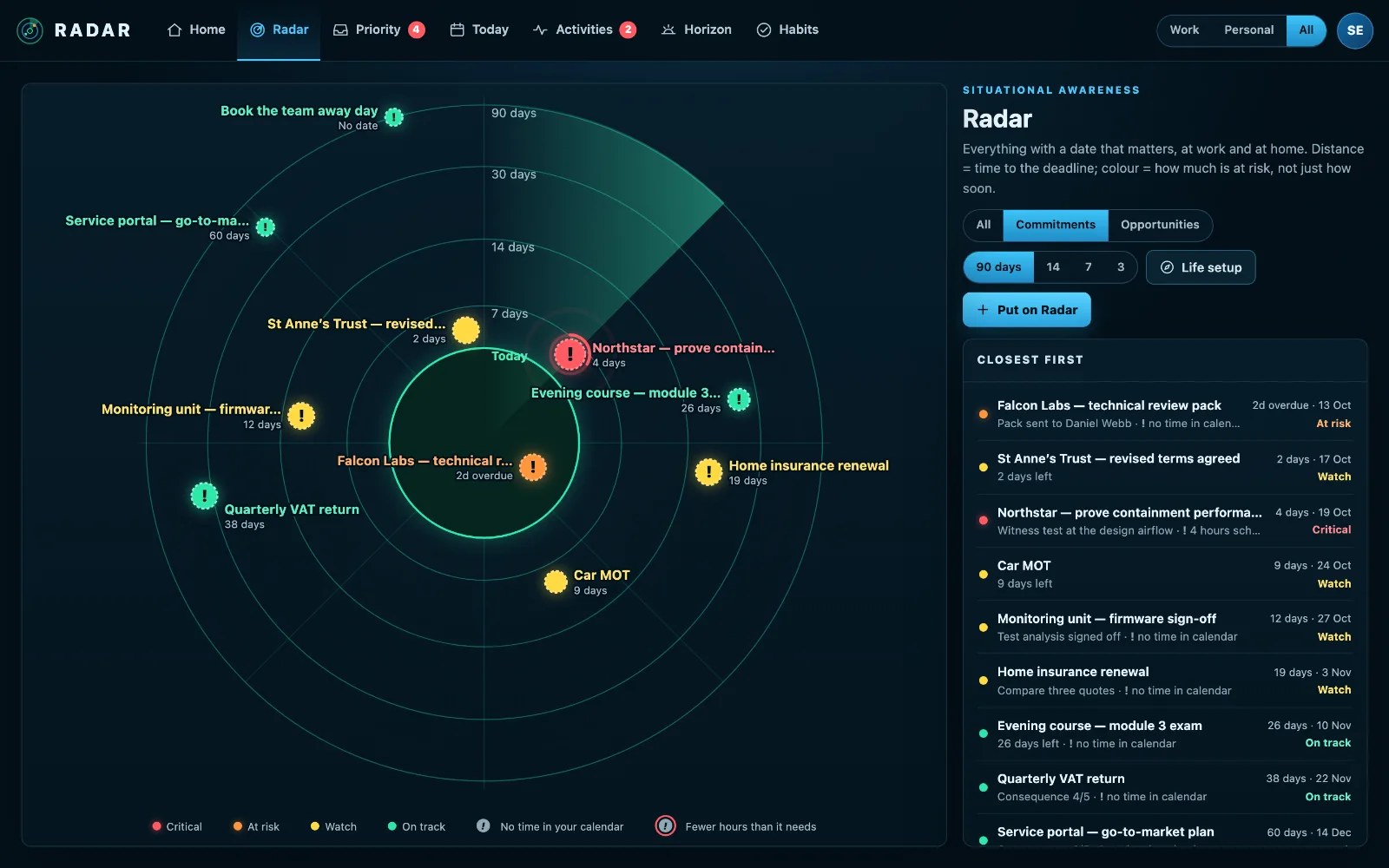
When you are self-employed, every deadline is yours: client work, invoices, the tax return and the MOT. Radar puts them on one radar of the next ninety days and checks your calendar for the time to do each one.
£10 a month at the founding price until 31 March 2027, locked for 24 months. Your money back within 14 days if it isn’t for you.
Nobody reminds the self-employed
There is no manager asking how the project is going, no accounts department chasing the invoice, no colleague who knows the Self Assessment deadline is next month. Every date is held in your head, between client calls.
The work is rarely the problem. Knowing what is closing in, and whether this week has room for it, is.
Clients, money and tax, on one radar
Client deadlines with time attached
Give each job the hours it needs and Radar measures them against the free time in your calendar before the date.
Tax dates set up once
Life setup asks whether you file a Self Assessment return, and puts the deadline on your Radar with a reminder two months ahead, every year.
Money owed
Connect Xero and the invoices still owed and the quotes about to expire are on the same screen as the work.
The rest of life too
The MOT, insurance renewals and birthdays, labelled Personal, and one switch to see only work when you need to.
How to stay on top of deadlines when you work for yourself
Working for yourself means holding every deadline: each client’s, the tax return, invoices and the rest of life. A simple system beats a clever one.
- Put every client deadline somewhere with the hours it will take, not just the date.
- Block time for client work as soon as a job is agreed, before the diary fills.
- Put the tax dates in once, with a reminder well ahead: the Self Assessment online deadline is 31 January, and Making Tax Digital adds quarterly updates for those it applies to.
- Review money owed every week, and chase on the due date.
- Keep personal dates beside work ones, because they compete for the same hours.
Radar holds all of it on one screen, asks for the dates once, and checks your calendar has room for the work.
Three steps
Connect your calendar
Outlook, Google Calendar or a calendar feed.
Answer Life setup
A few questions at a time: tax, car, home, family.
Add your client work
Dates and hours. Radar does the arithmetic.
What it connects to
| Connection | What Radar uses | Status |
|---|---|---|
| Microsoft 365 and Outlook.com | Outlook calendar | Verified 29 Sep 2026 |
| Google Calendar and Tasks | Google Calendar | Verified 20 Sep 2026 |
| Xero | Sales invoices still owed | Verified 20 Sep 2026 |
Verified means read from a real account on that date; beta means built and tested, and labelled until it has been. Every connection →
Questions
Does Radar do my tax return?
No. It holds the dates and reminds you in good time. Our guides set out the Self Assessment and Making Tax Digital dates, with their official sources.
Is it worth it for one person?
It is priced per person, and built for people who carry everything themselves. If it isn’t for you, you get your money back.
Can I keep work and personal apart?
Everything is labelled Work or Personal, and one switch shows either or both.
Related
Put every deadline that’s yours on your Radar.
Client work, tax dates and the rest of life, on one screen.