A deadline tracker that checks you actually have time
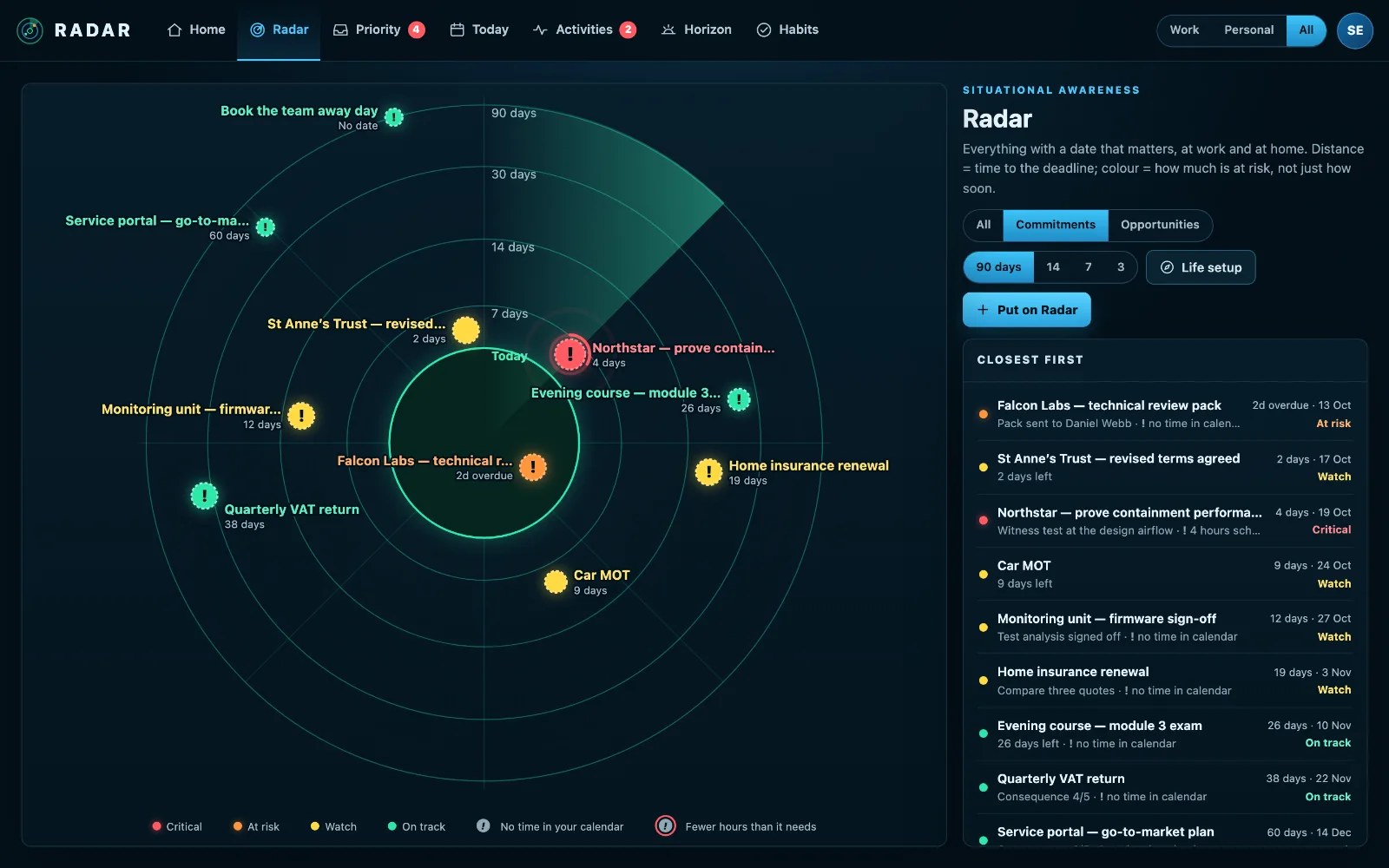
Radar is a deadline tracker for the next ninety days. It puts every deadline on one radar, closest in the middle, and checks your calendar for the free hours each one still needs, so you hear about a squeeze weeks before the date.
£10 a month at the founding price until 31 March 2027, locked for 24 months. Your money back within 14 days if it isn’t for you.
A list of dates says nothing about whether you’ll make them
Most deadline lists show how many days are left. Eleven days sounds comfortable until you look at the diary and find three and a half free hours in it, and a job that needs six.
The deadlines that hurt are rarely the ones nobody wrote down. They are the ones on a list that nobody checked against the week.
Deadlines, distance and time, on one screen
Closest in the middle
Rings read Today, 7, 14, 30 and 90 days. A deadline moves inwards as it comes, and its colour is risk, not just time: what it costs if it slips, how sure you are, what it waits on and how far through you are.
Time, not just dates
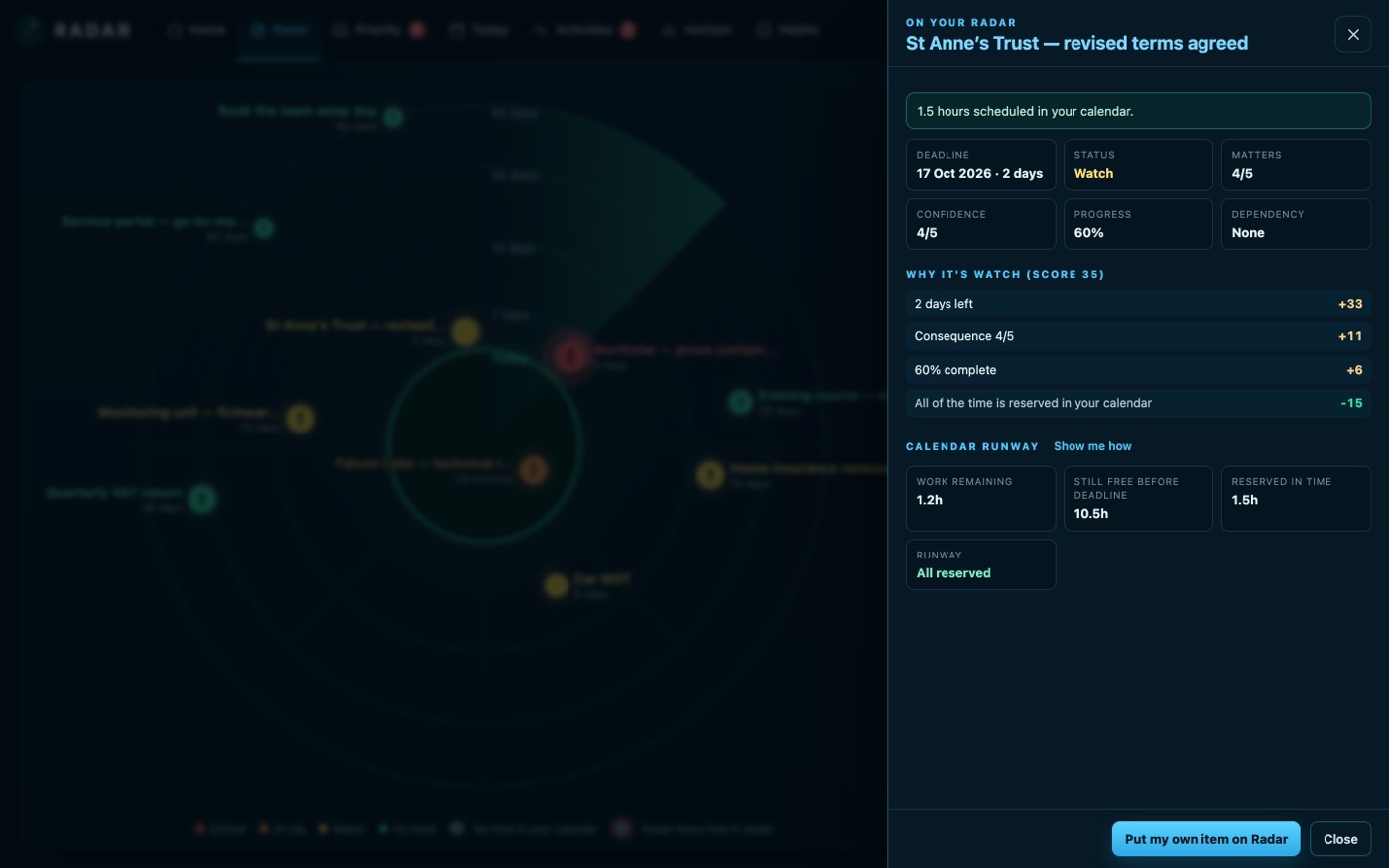
Say how many hours a job needs and Radar measures them against the free time left in your calendar before the date: Sufficient, Just enough or Insufficient, and how many hours are missing if it is short.
Book the time in one press
With Outlook or Microsoft 365, Radar books focus blocks for the work, as one sitting or sessions of up to two hours, and keeps checking they are still there.
From wherever the deadline is
Put an email, a task or a CRM activity on your Radar in one press, or add a deadline yourself. Anything past ninety days waits on the Horizon until it is close enough to matter.
Zoom in on a week on fire
Zoom to 14, 7 or 3 days and the outer ring becomes that range, so a crowded week spreads out. Press Critical or At risk to see only those.
Reminders you choose
A week before, the day before and on the day as standard, or two weeks to nine months ahead, or none at all. On your phone, held quietly overnight, and in a Monday morning email of the week ahead.
How to track deadlines so none of them ambush you
A deadline only stays safe if three things are known about it: the date, how much work is left, and how much free time there is before the date. Most systems hold the first and guess at the rest.
- Write down the real date, not the hoped-for one: when the customer actually needs it, or when the form actually closes.
- Estimate the hours honestly, and revise the estimate as you learn more. Half done means half the hours still to find.
- Check the estimate against your calendar, not against the number of days left. A week of meetings is not a week.
- Book the time early, while there is still a choice of when, and check it is still there a few days later.
- Look at the next ninety days once a week, and the next fourteen whenever a week gets busy.
Radar does the third and fifth for you, every time your calendar changes, and makes the fourth one press.
Three steps
Connect a calendar
Outlook, Microsoft 365, Google Calendar or any published calendar feed. It is a sign-in, and it takes a minute.
Put your deadlines on it
Add them, or press Put on Radar on an email, task or activity. Give each one the hours it needs.
Watch the runway
Radar flags the jobs whose time has run out, weeks ahead, and books the time when you ask.
What it connects to
| Connection | What Radar uses | Status |
|---|---|---|
| Microsoft 365 and Outlook.com | Outlook calendar | Verified 29 Sep 2026 |
| Microsoft 365 and Outlook.com | Reserve a focus block in your calendar | Verified 29 Sep 2026 |
| Google Calendar and Tasks | Google Calendar | Verified 20 Sep 2026 |
| Calendar feed (ICS) | A subscribed calendar | Verified 23 Sep 2026 |
Verified means read from a real account on that date; beta means built and tested, and labelled until it has been. Every connection →
Questions
How is Radar different from a to-do list?
A to-do list holds tasks and dates. Radar holds the deadlines that matter, reads the rest from the tools you already use, and checks each one against the free time in your calendar, so it can tell you a job is in trouble while it is still weeks away.
Do I have to enter every task?
No. Radar reads your calendar, inbox, task lists and CRM if you have one. You add only what no system tracks, like a promise you made or a report you owe.
What counts as free time?
Your working hours, 09:00 to 17:30 on weekdays, up to the deadline, less every busy event in your connected calendars. Gaps under half an hour are not counted as time to work in.
Can I use it for home deadlines too?
Yes. Renewals, the MOT and school forms go on the same radar, labelled Personal, and one switch shows Work, Personal or both.
Related
Put your deadlines on your Radar.
Connect a calendar, add what is due, and see which jobs have the time and which don’t.