For small business owners who carry everything themselves
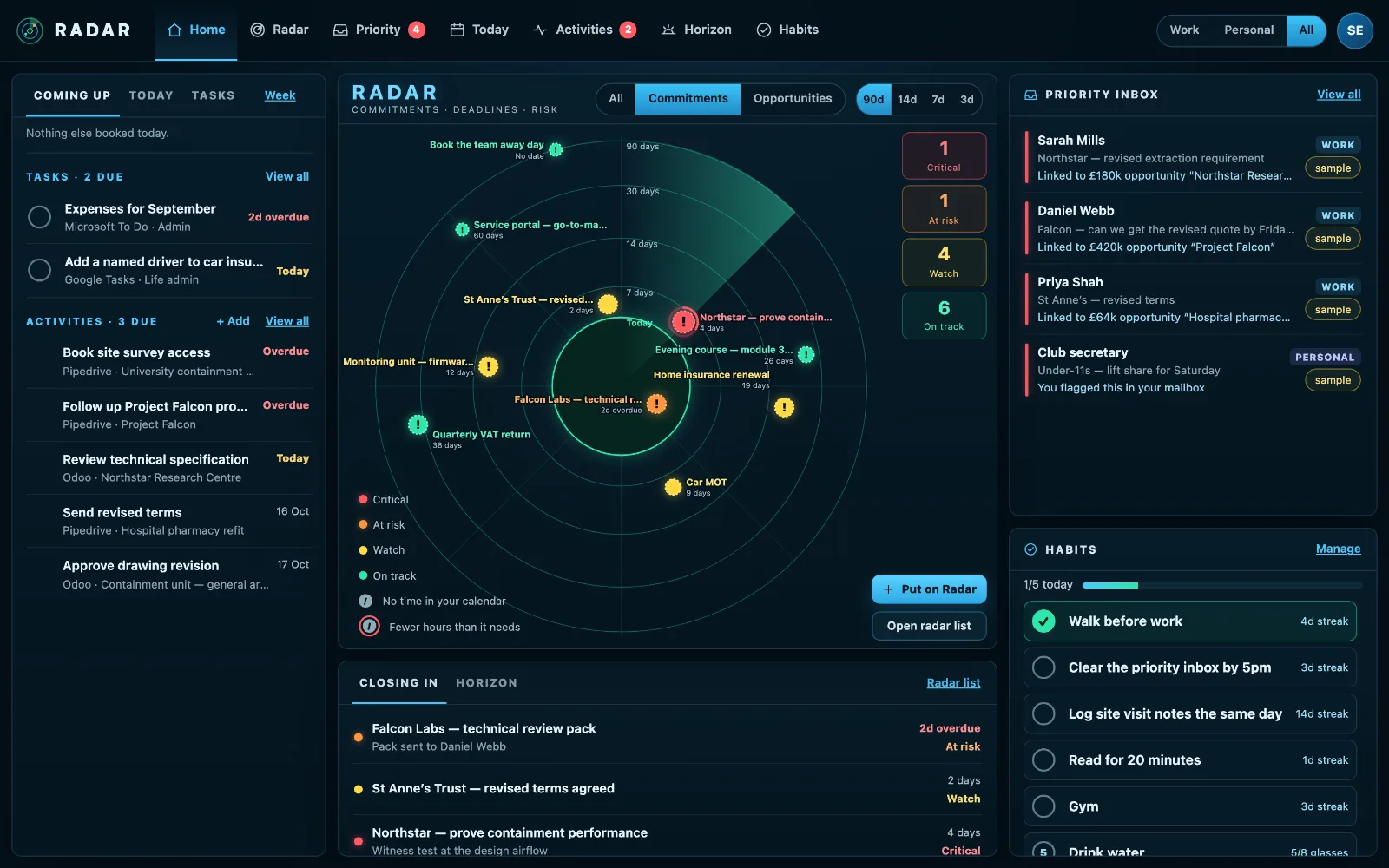
Radar is built for small business owners who are the sales team, the delivery team and the accounts department: one radar of everything closing in over the next ninety days, at work and at home, with a check on whether there is time for it.
£10 a month at the founding price until 31 March 2027, locked for 24 months. Your money back within 14 days if it isn’t for you.
In a small firm, nobody else is watching
In our own survey of owners of UK firms with 1 to 19 staff, four in ten said something had slipped in the last three months that cost them money or a customer. A follow-up missed, a renewal that lapsed, a deadline that arrived before the work was done.
The date was nearly always written down somewhere. What nobody checked was whether there was time to do the work.
One screen for a business and a life
Customers, deadlines, cash
The customers waiting on a reply, the deadlines on your calendar, the deals in your CRM and the invoices owed in Xero, on one screen.
Time for the work
Radar checks your calendar for the hours each job needs and books them in Outlook when you press.
A CRM is optional
Radar works from your calendar and inbox alone. Add Pipedrive, Odoo or Xero if you use them.
Home on the same screen
The MOT, the insurance renewal and the school form, labelled Personal, so a busy week at work doesn’t quietly cost you at home.
Seats when you grow
Add colleagues as seats. Nobody sees anyone else’s Radar, the owner included, and an owner can require two-factor sign-in.
Made in the UK
Radar is made by a UK company and runs on servers it controls in the United Kingdom.
How small business owners stop things slipping
In a small firm the owner is often the safety net for everything: the customer, the deadline, the invoice and the van’s MOT. A few habits make the net stronger.
- Keep one place where everything with a date ends up, rather than a list per system.
- Check each deadline against your calendar, not just the date. A full week is the usual reason things slip.
- Answer the customers waiting on you before starting new work.
- Look ninety days ahead once a week, so renewals and tax dates arrive as plans rather than surprises.
- Put the home dates in the same place. A busy month at work is when the car insurance lapses.
Radar is built to be that one place, read from the calendar, inbox and systems you already use, with the time check done for you.
Three steps
Connect your calendar and inbox
Microsoft 365, Outlook.com, Gmail or Google Calendar.
Add what you use
Pipedrive, Odoo, Xero, To Do, Planner, Google Tasks, if you have them.
Check it each morning
What is closing in, who is waiting, and whether the week has room.
What it connects to
| Connection | What Radar uses | Status |
|---|---|---|
| Microsoft 365 and Outlook.com | Outlook calendar | Verified 29 Sep 2026 |
| Microsoft 365 and Outlook.com | Outlook mail | Verified 29 Sep 2026 |
| Gmail | Gmail | Verified 20 Sep 2026 |
| Pipedrive | Open deals | Verified 29 Sep 2026 |
| Xero | Sales invoices still owed | Verified 20 Sep 2026 |
Verified means read from a real account on that date; beta means built and tested, and labelled until it has been. Every connection →
Questions
Is Radar a project management tool?
No. It doesn’t replace your CRM, accounts or task apps. It reads them, and shows what is closing in across all of them.
How long does setting up take?
Connecting a calendar takes a minute. Getting started walks you through the rest in three short stages, a page at a time.
Can my team use it?
Yes. Each person has their own private Radar; the workspace shares company knowledge, never anyone’s radar or inbox.
Related
Put your business on your Radar.
Connect your calendar and inbox and see what is closing in this week.