A priority inbox for Outlook that shows who is waiting on you
Radar is a priority inbox for Outlook and Gmail: it shows the handful of conversations waiting on you, ranked by who is waiting, for how long and what it is about, with promotions and notifications left out.
£10 a month at the founding price until 31 March 2027, locked for 24 months. Your money back within 14 days if it isn’t for you.
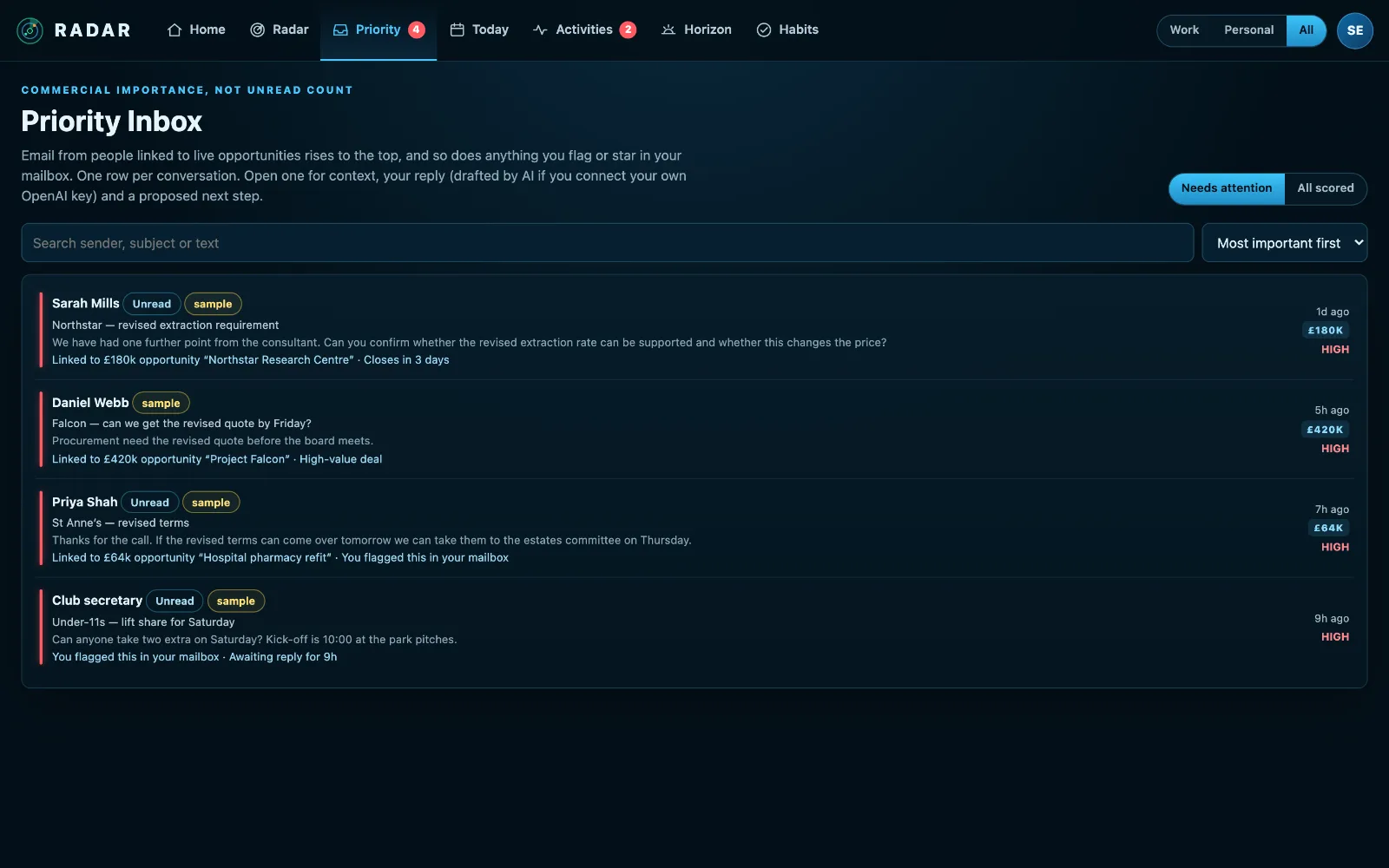
An unread count treats every email the same
A newsletter, the customer with a decision on Friday and the insurer who needs documents all count as one unread message. The one that matters sinks under forty that don’t.
And once it has been read, it stops looking urgent at all, even though the person is still waiting for an answer.
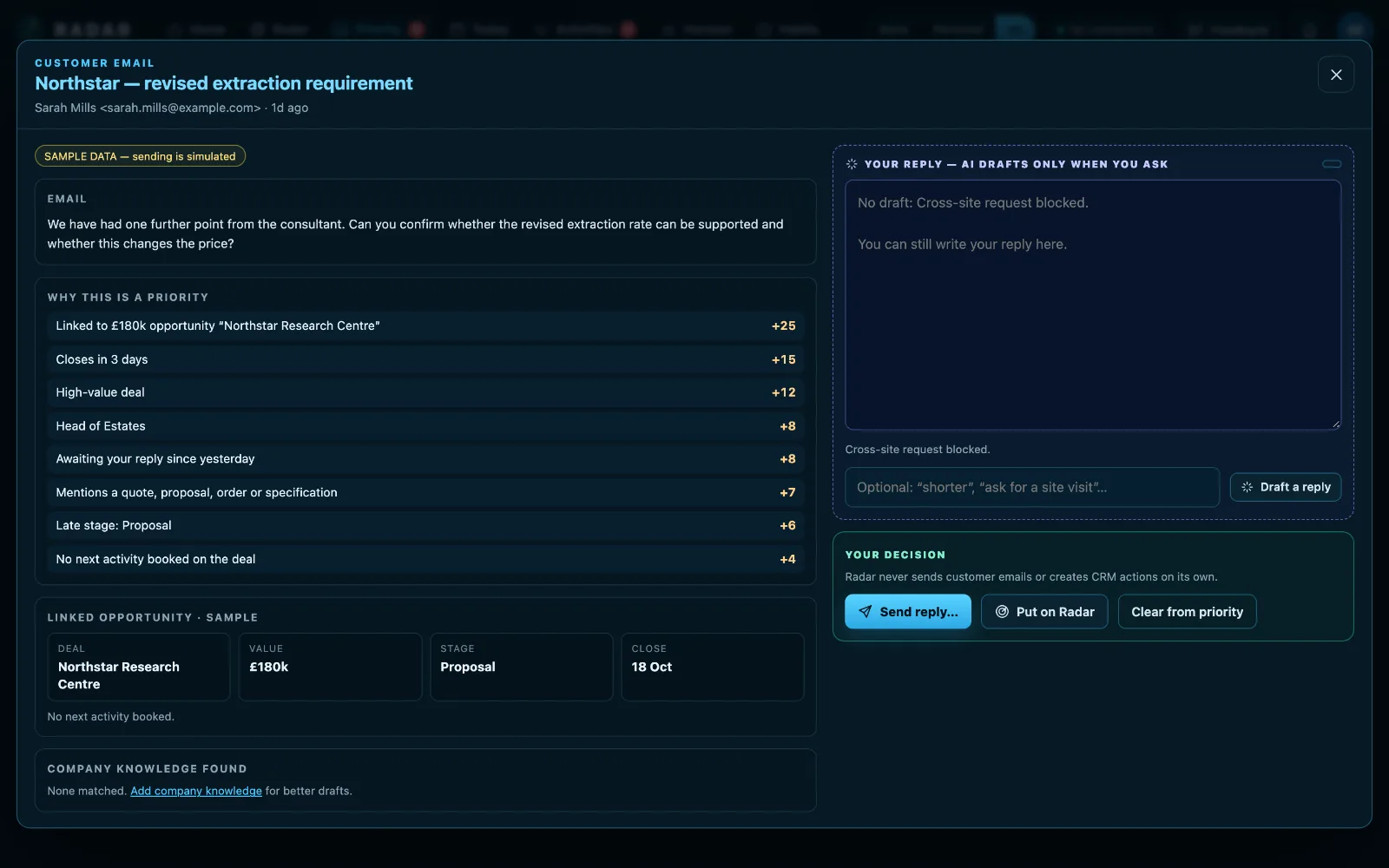
The email that needs you, and why
Flagged means a priority
Flag it in Outlook or star it in Gmail and it stays a priority until you clear the flag. That is your decision, so Radar treats it as one rather than another few points on a score.
Folders you choose
Mail you file into a folder like “To Action” can be treated as yours to act on. Or mark a whole mailbox as one where everything in the inbox is a priority.
One row a conversation
Eight replies about one thing is one thing to do, led by the newest message and ranked by the most important thing anyone said in it.
Bulk mail is left out
Gmail’s Promotions, Social, Updates and Forums tabs score nothing unless you starred or filed the message yourself. Automated senders are left out.
With the deal beside it
If you use a CRM, Radar matches the sender to the deal, so you see the value and close date before you reply.
Handle it there
Reply with your mailbox’s own signature and logo, archive it, or put it on your Radar with a date and the hours it needs. Radar never sends anything until you press Send.
How to keep on top of the emails that matter
Inbox zero is a lot of work for very little: most email needs no action at all. What matters is the short list of conversations where somebody is waiting on you.
- Decide what “waiting on me” means: a customer, a colleague, anyone who asked a question you haven’t answered.
- Flag what you mean to deal with, and clear the flag when it is done. A flag is a decision; an unread count isn’t.
- File the mail you will act on later into one folder, and treat that folder as a list.
- Let promotions and notifications go by. They are rarely urgent, whatever their subject line says.
- Once a day, work the short list, not the whole inbox.
Radar keeps that short list for you across Outlook and Gmail, one row a conversation, with the reason each one is on it.
Three steps
Connect your mailbox
Microsoft 365, Outlook.com or Gmail. Add a second mailbox beside the first.
Choose what counts
Pick any folders to treat as priorities. Flags and stars work from the start.
Clear the list
Reply, archive or put it on your Radar. What is left is what is still waiting.
What it connects to
| Connection | What Radar uses | Status |
|---|---|---|
| Microsoft 365 and Outlook.com | Outlook mail | Verified 29 Sep 2026 |
| Microsoft 365 and Outlook.com | Mail folders you choose | Beta |
| Microsoft 365 and Outlook.com | Move a message to Archive | Beta |
| Microsoft 365 and Outlook.com | Reply to a message | Beta |
| Gmail | Gmail | Verified 20 Sep 2026 |
| Gmail | Send a reply | Beta |
Verified means read from a real account on that date; beta means built and tested, and labelled until it has been. Every connection →
Questions
Does Radar delete or move my email?
Radar never deletes an email you have received or sent, and moves one only when you press Archive on it.
Does it read my whole mailbox?
It reads the inbox, and any other folders you choose: the subject, sender, time and a preview, to work out what is waiting on you.
Can it write replies for me?
If you add your own OpenAI key, Draft a reply writes one using the email and its context, when you press the button. You edit it and send it yourself, or write every reply by hand.
Does it work with Gmail?
Yes. Gmail and Outlook can be connected side by side, and each mailbox can be Work or Personal.
Related
See the emails that are waiting on you.
Connect Outlook or Gmail and the few conversations that need you come to the top.