Time management: what it means, and why days are not hours
Time management is deciding what to do with the hours you actually have, before a deadline decides for you. It comes down to three things: seeing what is coming, choosing what matters most, and putting real time in your calendar for it.
£10 a month at the founding price until 31 March 2027, locked for 24 months. Your money back within 14 days if it isn’t for you.
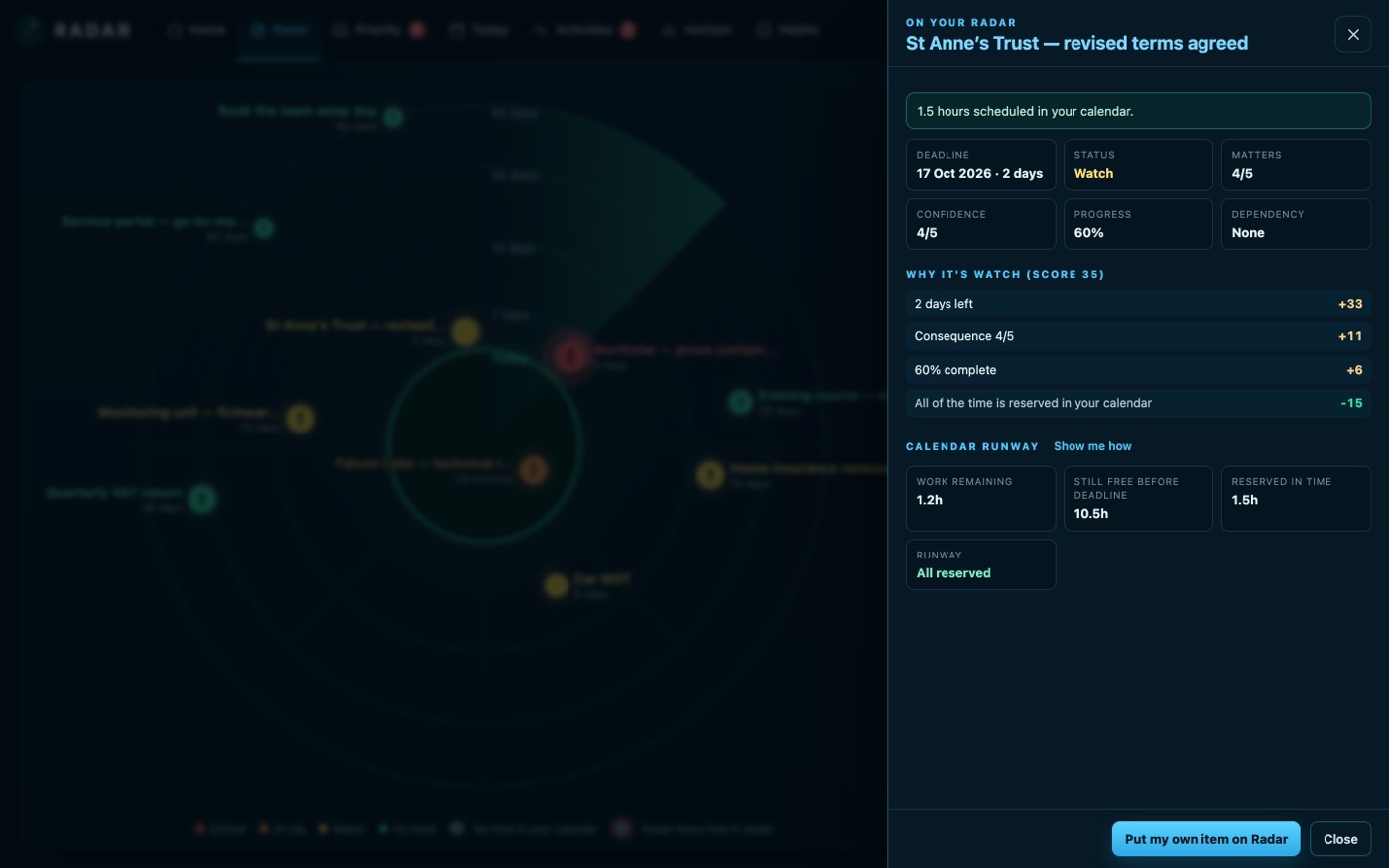
Most time management fails at the calendar
A to-do list says what needs doing. It never says whether there is time to do it. The report needs six hours, it is due Friday, and between now and then the calendar has four free hours scattered between meetings. Nothing on the list tells you that until Thursday night.
The days look free from a distance and fill up as they come closer. Good time management is noticing that while there is still room to move something.
Where Radar helps
See what is coming
Every deadline, deal and renewal for the next ninety days on one radar, closest in the middle, coloured by how much risk it carries.
Check the hours
Calendar runway sets the work still to do against the free time in your calendar before the deadline: enough, just enough or not enough, and what to do next.
Reserve the time
Book the hours as focus blocks in your Outlook calendar in one press, as one sitting or as sessions, and Radar keeps checking they are still there.
Mark what has no time
Anything on the radar with no time set aside carries a mark, so the job you are hoping to fit in somewhere stands out.
A look back, never a score
How I performed counts what you finished, what was on time and the focus time you used. Counts of what happened, never a productivity score.
Time management methods that work
There is no single right method. The ones that last share one thing: they turn a list of jobs into decisions about time.
The urgent and important matrix
Sort each job by two questions: is it urgent, and is it important? Do what is both now. Schedule what is important but not urgent, because that is where most good work lives and it is the first thing a busy week squeezes out. Hand on what is urgent but not important if you can, and drop what is neither. It is often called the Eisenhower matrix.
Time blocking
Give each important job a block in your calendar, as if it were a meeting with yourself. A blocked hour is visible to you and to anyone booking your time, and it makes the real size of your week obvious: if the blocks do not fit, the plan does not either. Our guide to time blocking in Outlook shows how.
The Pomodoro Technique
Francesco Cirillo's method: work on one thing for 25 minutes, take a short break, and take a longer break after four rounds. It helps most with starting something you have been putting off.
Check the hours before you agree the date
Before agreeing a deadline, count the free hours you have before it, not the days. A fortnight away sounds generous; a fortnight of half-booked days might hold eight free hours. We call that figure calendar runway.
A weekly look ahead
Once a week, look two or three weeks ahead rather than only at the next few days:
- What is due, and how many hours does each job still need?
- Where in the calendar will those hours come from?
- What will have to move, and who needs telling now rather than on the day?
Three steps
Connect your calendar
Outlook, Google Calendar or any calendar feed.
Put the work on your Radar
With a date and the hours it needs.
Reserve the time
Before the week fills up around it.
What it connects to
| Connection | What Radar uses | Status |
|---|---|---|
| Microsoft 365 and Outlook.com | Outlook calendar | Verified 29 Sep 2026 |
| Microsoft 365 and Outlook.com | Reserve a focus block in your calendar | Verified 29 Sep 2026 |
| Google Calendar and Tasks | Google Calendar | Verified 20 Sep 2026 |
| Calendar feed (ICS) | A subscribed calendar | Verified 23 Sep 2026 |
Verified means read from a real account on that date; beta means built and tested, and labelled until it has been. Every connection →
Questions
What does time management mean?
Planning how you use your time so the most important work gets done before it is due: seeing what is coming, choosing what to do first, and setting aside real hours for it.
Why is time management important?
Because time is the one thing a deadline cannot give back. Planning early leaves room to move work, ask for help or agree a new date; leaving it late leaves only working longer or missing the date.
What are time management skills?
Prioritising, estimating how long a job takes, planning the week ahead, protecting time for focused work and saying no, or not yet, to work that does not fit.
What is the urgent and important matrix?
A grid that sorts jobs by whether they are urgent and whether they are important: do the urgent and important, schedule the important, hand on the urgent but unimportant, and drop the rest.
What are the best time management tools?
The ones that join your list to your calendar. A list alone cannot tell you whether there is time; your calendar is where the hours are. Radar puts the two together for the next ninety days.
Related
See the hours, not just the list.
Every deadline for the next ninety days, and whether your calendar has the time for it.